How to use
How to use Tech Interview Prep
Pick a way in, save what you want to revise, and come back to where you stopped.
Sign up free
Free: progress saved in My Learning, bookmarks and notes, and reviews of what you missed.
Start here
Start from where you are
I am exploring my next role
- Browse the job roles
- Open one to see what it covers
I have an interview at a specific company
- Open its card for your job role
- Fill the gaps with the role's Top 100
My interview is tomorrow
- Go through My Bookmarks
- Clear the reviews due on your Dashboard
I only have 15 minutes
- Open your Dashboard
- Press Continue, or clear a due review
I saw something and cannot find it
- Search for a word you remember
- Check Search History and My Bookmarks
How it works
Four steps
- 1
Pick a way in
By company, job role or concept. Mix them if you like.
Find your company → - 2
Study
Read the guide, answer the Q&A aloud, then check yourself with MCQs.
Browse concepts → - 3
Save
Bookmark, write a note, or ask about anything unclear.
Open My Bookmarks → - 4
Come back
Press Continue on your Dashboard, then clear your reviews.
Open Dashboard →
See it first
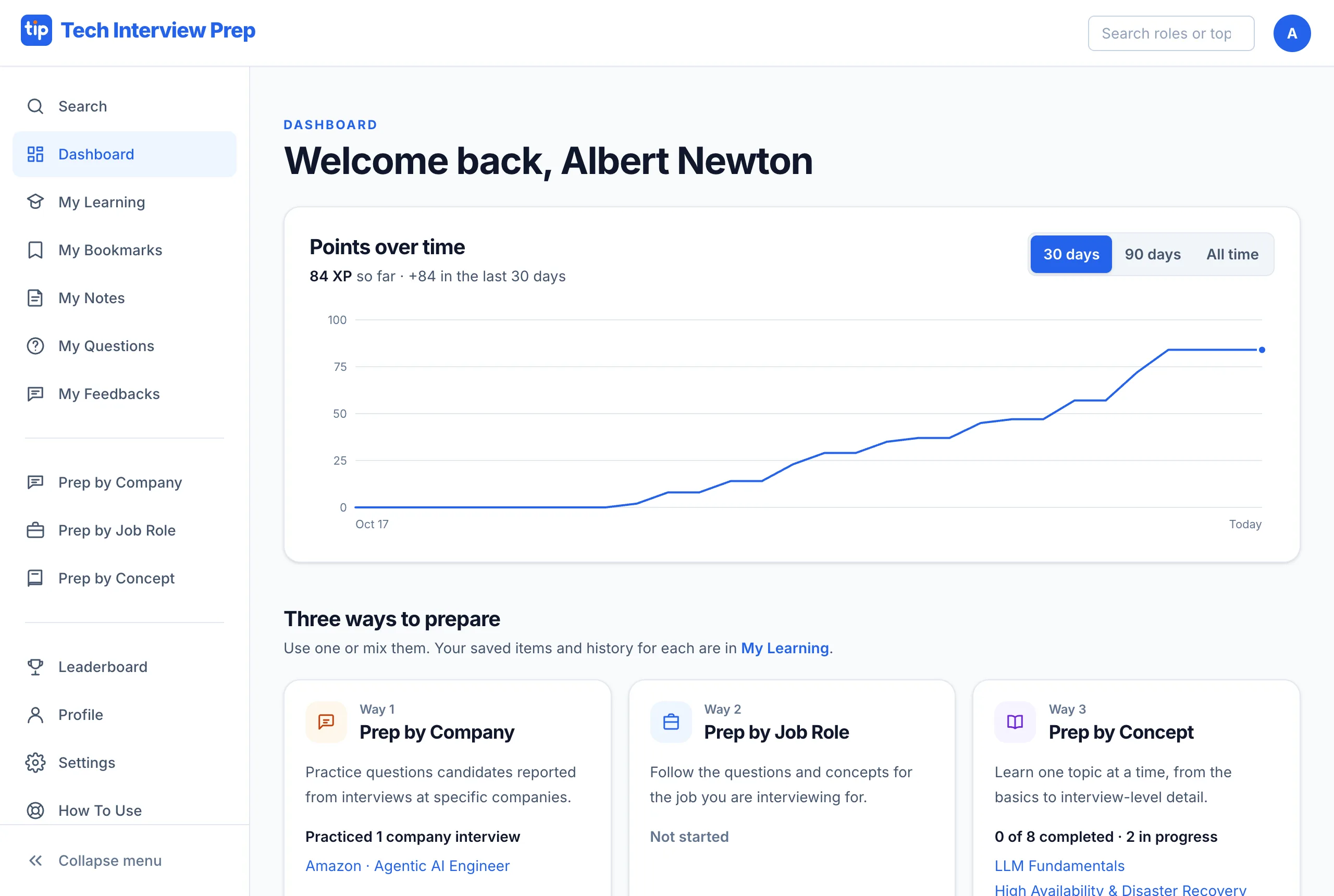
Your Interview Preparation Dashboard
Your Dashboard, with a free account.
- See your points climb over time
- Continue right where you stopped
- Every page is one click away
Every part of the site
What each part does
Prepare
Prep by Company
- Pick the company, then your job role
- Read the Overview of how it interviews
- Practice the reported Q&A and MCQs, each with its source
Prep by Job Role
- Work through the role's Top 100 Q&A and MCQs
- Answer aloud before you reveal the answer
- Mark each one Got it or Need to revisit
Prep by Concept
- Read the short guide first
- Answer its Q&A, then check yourself with MCQs
- Every MCQ option comes with an explanation
Find and save
Search
- Type a word you remember
- Overviews come first, then Q&A, then MCQs
- Signed in, your last 25 searches are kept
My Bookmarks
- Bookmark any Overview, Q&A or MCQ
- Revise from it in the last days before the interview
My Notes
- Write a private note on any item
- Find all your notes here, sorted your way
My Questions
- Ask about anything unclear on an item
- Read the answer next to your question
My Feedbacks
- Tell us what is wrong or missing
- See and edit what you sent
Track progress
Dashboard
- Your start page after signing in
- See your points over time
- Press Continue on the way you prepare
My Learning
- Everything you started, by company, role and concept
- See how far along you are on each
- Continue where you stopped
Review
- Missed questions come back on a schedule
- Ones you were unsure of return sooner
- Clear what is due before starting a new topic
Assessments
- A fixed set of questions with a time limit
- Limited attempts and final answers
- Take one after studying, not while learning
Points
How points work
MCQ points by difficulty. Your net points set your place on the Leaderboard.
- Answer again after 24 hours; your latest answer counts
- XP only goes up: you earn it the first time you get a question right
- 5 scored answers in a day keep your streak going
| Answer | Easy | Medium | Hard |
|---|---|---|---|
| Right | +1 | +2 | +3 |
| Wrong | −1 | −1 | −1 |
| Skipped | 0 | 0 | 0 |
Want to know what the site is for?
About says how the material is organized and checked. Something unclear? Tell us.